Ovation v10 - Hotfix 1- Release Notes.
- David Jacques
- Robin Sartoretti

Ovation v10 Keys
Important:
Ovation 10 requires Ovation v10 keys.
To get a free upgrade, you need a valid ASM contract and contact your Sales Partner, providing your SafeNet Dongle Serial number and/or Cloud Activation Key number.
Do not install this version if you do not yet have valid keys
Installation
Please consult the Installation Guide on https://www.merging.com/support/downloads#ovation for details on the hardware and software installation procedure and Authorization Key registration process.
RAVENNA users will have to install the NET-MSC-GBEX1 PCIe Ethernet card provided by Merging Technologies. TURN YOUR COMPUTER OFF (shut down then switch the power off). Next plug the NET-MSC-GBEX1 card into one of the PCI-Express bus slots on your computer and turn the power back on. The NET-MSC-GBEX1 card will only be operational once the MassCore runtime is installed. Refer to the Ovation Installation Guide for more details.
- To install the Ovation software insert the Ovation Installation Media - the installation program should auto-start.
- To install MassCore launch the MT Security Settings, go to the MassCore page and install the MassCore RunTime (a MassCore base key is required along with MassCore 64bit and a RTX64 3.0 key). Refer to installation guide for more details.
Warning: Make sure that the Windows 10 version you are installing onto is supported by Ovation, as often updates can break the compatibility.
All details in the separate Ovation installation guide.
Updates
Please check our Web site http://www.merging.com periodically for information, patches and updates.
Ovation 10 Installer Information
Ovation 10 is compatible with the following Operating Systems
- Windows 10 Professional (64bit): MassCore/RAVENNA, Native & Native/RAVENNA ASIO
Ovation 10 is supported under the Windows 10 updates;
- May 2021 update 21H1 supported since Ovation 9 HotFix3 & RTX64 3.7.4
- October 2020 update 20H2 supported since Ovation 9 HotFix3 & RTX64 3.7.4
- May 2020 Update 2004 supported since Ovation 9 HotFix 3 & RTX64 3.7.4
- Nov 2019 Update (1909) supported since Ovation 9 & RTX64 3.7
- May update (1903) supported since Ovation v8.0.5 HotFix
- October update (1809)
If you run a previous Windows 10 version, Merging recommends you update it.
WARNING: Ovation 10 running MassCore mode is not supported and certified under the Windows 10 update 21H2 or Windows 11.
WARNING: Ovation 10 is supported on 4th Generation Intel Core Processors (4XXXK and higher) and will not launch on previous Processors generation
Recommended specifications https://merging.atlassian.net/wiki/pages/viewpage.action?pageId=4817980
Ovation 10 installation notes
- Ovation 10 runs on the new Ovation 10 keys as of the Release Candidate.
- Ovation 10 runs on the same MassCore as the Ovation 9 HotFix 3, RTX64 v3.7.4.5222
- The Ovation 10 installer comes only as a 64bit version (64bit OS)
- Before you perform a Windows 10 update on a system already running a MassCore version it will be important for users to remove MassCore from the MT Security MassCore tab prior to performing a system update. Details below.
Take note that when selecting uninstall MassCore you will need to reboot your system as the uninstallation is completed during the system reboot.Note #1
We highly recommend users to defer the Windows updates, so that it does not harm your system here for details on how to defer updates
Windows 10 users should never update to Beta Windows version or major new updates before making sure they are supported by Merging.
Note #2
Users wanting to perform a Windows version update must follow the procedure here https://merging.atlassian.net/wiki/pages/viewpage.action?pageId=4819590
Users that apply Windows updates must refer to the Merging Compatible Windows updates here Once you have updated your Windows 10, follow the Pyramix and MassCore installation.
Note #3
Ovation 10 running MassCore mode is not supported and certified under Windows 11.
- SSK-HUD-RTX is no longer required as of Ovation 9 HotFix 3 and above that includes the MassCore security scheme. The Security now being fully protected by Merging Keys.
- A Cloud Security (dongle-less) is available since Ovation 9.
- The VB Plugins (VS3) are no longer installed along Pyramix as of the 25th Anniversary version they come with a standalone installer. Download and run the VB Plugin – VS3 installer after having installed Pyramix. https://merging.atlassian.net/wiki/display/PUBLICDOC/VB+Plugins+%28VS3%29+standalone+installer
Native Installation Notes
- Ovation 10 runs on the new Ovation 10 keys as of the Release Candidate.
- Ovation 10 can be installed on Windows 10 – 64 bit (see Windows 10 version details above)
- It is necessary to remove the previous Ovation and Pyramix versions, if there is one, from the Windows Programs and Features, then reboot your system before installing Ovation 10.
- Follow the Ovation Installation Guide for all details
- ANEMAN installer is not included in the Ovation Installer.
Please download and install the latest ANEMAN in order to manage and monitor your AoIP devices from http://www.merging.com/products/networked-audio/aneman
MassCore Installation Notes
- Refer to the Ovation 10 Installation Guide for installation procedure and details on the specific BIOS settings and system configuration.
- Ovation 10 runs the same MassCore RTX64 v3.7.4.5222 as Ovation 9 HotFix 3.
- It is necessary to remove the previous Ovation and Pyramix versions, if there is one, from the Windows Programs and Features, and then reboot your system before installing Ovation.
Take note that when selecting uninstall MassCore you will need to reboot your system as the uninstallation is completed during the system reboot
Unless you are planning to update your Windows 10 it is recommended to first remove MassCore before performing the update. In such case follow the procedure document
https://merging.atlassian.net/wiki/pages/viewpage.action?pageId=4819058 - After installing Ovation 10 MassCore users might need to uninstall their previous MassCore from the MT Security setting, MassCore Tab, depending on the previous Ovation version you were running.
If there is an older version present you will be warned and required to reboot before updating to the latest version. - If your Ovation system never had a MassCore version before, users will have to install the new MassCore version from the MT Security Settings > MassCore tab.
A valid MassCore RTX64 -3.0 key is no longer needed as of Pyramix 25th HotFix 3.
Ovation 10 users must refer to the Ovation 10 Installation Guide for details Ovation_10_Installation_Guide.pdf
Warning: Windows 7 is not supported with Ovation10.
Merging Windows 10 Configuration Guide
https://merging.atlassian.net/wiki/display/PUBLICDOC/Windows+10+Configuration
At the Ovation or Pyramix launch a warning message box will be displayed if your system updates settings are not configured upon Merging’s recommendations.
Additional Notes
- For users with Ovation and VCube installed on the same system, it is mandatory that you upgrade to VCube 10 to run alongside Ovation 10.
- A MTCleanUp utility is available through Merging’s Support for those having install issues
Please refer to the Knowledge Base https://merging.atlassian.net/wiki/display/PUBLICDOC/MT+Cleanup
Ovation 10 Release Notes
New with Ovation 10
Dolby ADM Master file playback:
Ovation can now playback Dolby ADM Master files, by first importing the Dolby Atmos ADM Master file in Pyramix, then using the "Publish to Ovation" feature.
Currently, the Mixer configuration has to be manually adapted to the Dolby Atmos ADM Master file.
(The Pyramix mixer might be saved in the Organize tab, and imported in Ovation Mixer Organize tab).
The Pyramix Premium key is required for Dolby Atmos Master Import/Export/Editing.
Improvements
- 3D Panner updated:
- New Dolby Atmos Zones, Elevation and Snap features, to accommodate Dolby Atmos workflow.
3D Panning mode enabled by default in new projects. - VS3 Generator plugin - LTC Generator: Timecode generator option available in the VS3 Generator plugin, allowing to output LTC on an audio track.
Note : Since Pyramix 14 / Ovation 10 Hotfix 1, the Mute on Stop option is enabled by default.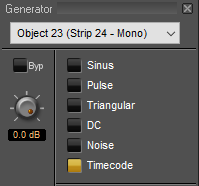
Current Limitations :
Reverse Playback not supported.
Bug fixes
Fixed Bugs in Ovation 10 Hotfix 1
- PMX140-36: Fixed. Stereo Dual Pan
- PMX140-39: TC Generator plugin: mute on stop by default
- Atmos ADM Import - Fixed import of FFOA at 00:00:00:00
- Atmos ADM Import - Fixed import of NOT_INDICATED render wrap mode
- Several Atmos maintenance
- Mixer Strip panner may display wrong front/rear values (display issue only)
Fixed Bugs in Ovation 10 RC1
New keys required for Pyramix 14 / Ovation 10 (as of the RC1)
- PMX140-19: Fixed. VS3 Control Panel: HiRes Screen resolution prevents the user from selecting Bridge or other items.
Fixed Bugs in Ovation 10 Beta3
Runs on Pyramix 25th / Ovation 9 / VCube 9 keys during the beta cycle.
- PMX125-109: Fixed. TC chase not working.
- PMX140-16: : Fixed. Poor Video Display Performance
- PMX140-17: Fixed. Cannot assign objects to channels above 64
Fixed Bugs in Ovation 10 Beta1 (inherits of the Hotfix fixes)
Runs on Pyramix 25th / Ovation 9 / VCube 9 keys during the beta cycle.
- PMX125-186: Fixed. DNxHD authorization key not working.
- PMX125-188: Fixed. Crash when opening project with a VST Design Works EQ6 VST3 with UI left open
- MSC-86: Fixed. VS3 control panel will warn user if a MassCore update needs to be installed.
Fixed Bugs in Ovation 10 Beta 0 (inherits of the Hotfix fixes)
Runs on Pyramix 25th / Ovation 9 / VCube 9 keys during the beta cycle.
- PMX125-188: Fixed. Crash when opening project with some VST
- PMX125-190: Fixed. Crash when removing an Atmos bus.
- PMX125-175: Fixed. Changing channel count error (referring to 4 billion channels)
- Sometimes Delay compensation not called properly.
- Issue in Mixer (Atmos) with soloing strips
- Object Router display better identification of if a strip is sent in an object bus.
- Issue of duplicated VST plug-ins in VST Scanner
- Added VST scanning option to properly support Waves Plugins
- Aux Busses are now safe when an Object Bus is enabled (meter was not fixed)
Fixed Bugs in Ovation v9
Requires Pyramix 25th / Ovation 9 / VCube 9 keys
- OV90-7: Fixed. Crash when opening several shows
- RAV-1270: Fixed. MAD ASIO can stop working when some ASIO host requests SR change.
- PMX125-66: Fixed. Fabfilter VST/VST3 issue with surround formats in Mixer
- PMX125-80: Ovation in cases was failing to re-attach to ASIO
- PMX125-89 & PMX125-90: Audio Engine Distribution dialog improvement
- Ovation crash at start up and potential High CPU readings
- MassCore load issue.
Additional notes
Ovation 10 Product Changes
- Windows 7 no longer supported
MassCore Technical Notes
- MassCore not supported on Core2Duo. Minimum requirement is a QuadCore. Find system recommendations here: http://www.merging.com/support/pc-config
- MassCore is supported under Windows 10 (64bit).
- Ovation 10 runs on Ovation 9 keys for the duration of the Ovation 10 beta cycle
- Ovation 10 runs on the same MassCore (RTX64 3.7.4) as of Ovation 9 Hotfix 3 and 4.
MassCore is now protected by Merging key security. - MassCore Ultra Low latency mode can generate noise if used on some configurations (Turnkey recommended).
In such cases we recommend instead the use of the AES67 mode or Extra Low latency mode. - Ovation Core indicator overloading (red) issue. Recommendation:
- Under a 64 bit OS: MassCore RTX 64bit users are allowed to run with Hyperthreading enabled. In such case users will by default have 2 Core allocated to MassCore RTX64, as we leave a pair number of Cores for Windows.
Merging recommends to having an SMP key under such configurations. - If, under the Bios power options, you have entries such as the Intel SpeedStep and CPU C State make sure that these options are disabled, as they are potential problems for MassCore. Refer to installation guide or the Windows Configuration guide for all details.
- Under a 64 bit OS: MassCore RTX 64bit users are allowed to run with Hyperthreading enabled. In such case users will by default have 2 Core allocated to MassCore RTX64, as we leave a pair number of Cores for Windows.
- MassCore & CPU load indicator range (as of Pyramix v10.2 and above)
- Green from 0% to 74% = Safe mode*
- Orange from 75% to 84% = Moderate Risk*
- Red from 85%->100% = High Risk
*MassCore users will have enhanced Core stability when using recommended dedicated Graphic Cards.
*Native users: Recent laptop owners are often confronted with performance problems when the CPU load is near the mid-point of load, where random CPU jumps can cause sudden glitches. This has also been seen when benchmarking with Non-Merging Applications on recent laptops.
- When the Core indicator blinks (red), it indicates a drop. Only be concerned if it occurred during Playback/Mix down or Record. To reset the Core drop simply click on the Core indicator. For more information please refer to the appropriate section in the User Manual.
- If you have VST Core peaks under MassCore, users should increase their VST Engine Buffer size value, located under the Ovation Settings. More information is available in the User Manual.
- External Insert plug-ins: The same input and output cannot be used in the External Insert plug-in and the Mixer at the same time, as they are exclusive to either one.
Plugin Engine Notice
The plugins engine Core distribution is done automatically for optimal performance. The total Core load of the Strips plugins will be processed first, followed by the total Core load of the Bus plugins. The engine is sequentially performing those two processing tasks. Meaning that a high Core load on the Strips plugins side is not summed with a high Core load on the Bus plugins side.
Changing a designated Core load to another one is not possible (unless modifying the Mixer configuration) and in no way would it change the total sum of processing passed to the engine for the chosen plugins.
About the Plugins Distribution Core Reading
We measure the time duration of the plugin itself. Time to process Audio Frame / Duration of the plugin itself * 100 = Load for a single plugin. We then compute the multiple plugins (on a chosen Strip or Bus by example) and we calculate the summation of those.
Do not to confuse with the readings below :
Pyramix CPU reading:
The CPU load displayed in the Pyramix bottom bar is not the CPU usage as computed in Windows task manager. CPU load in Native is computed in this way: (time to process audio frame) / (duration of one frame) * 100. Thus, it is the percentage of time used to process in one audio frame duration; this indicator is more useful than CPU Usage because it takes in account CPU stall during processing time.
In MassCore based systems the CPU: load indicator is supplemented by a VST: Core load indicator in the Title Bar. Refer to the Pyramix User Manual for more details.
Windows Task Manager:
Then windows will on its Task Manager CPU measures the CPU time as a percentage of the CPU's capacity.
So, in the end you just cannot open those 3 Windows and expect to have the same readings.
Merging Audio Device (MAD) 2.0
This ASIO RAVENNA/AES67 device supports Multi ASIO Clients and integrates WDM Support. With this new Device Driver multiple applications running ASIO can be launched in parallel on a same system, sharing the same sampling rate and at the same time multiple applications running WDM can be launched in parallel and have their own sampling rate automatically converted to the ASIO sampling rate. This allows monitoring the Windows system sound and any application (such as Spotify, YouTube, PC Sounds files,…) along with any ASIO applications.
Refer to the online MAD documentation for all details https://merging.atlassian.net/wiki/display/DSI/MAD+Docs
- Two different modes supported
- Unite Mode (Automatic Simplified connectivity for Anubis Music Mission, Horus and Hapi). Unite does not support the Anubis running the Monitor Mission.
- RAV/AES67 mode (Pro usage for Anubis, Hapi and Horus)
- NADAC mode (HiFi usage for NADAC users)
- MassCore mode
- Multi-Client ASIO and thus hosts supported
- Bridge channels support between ASIO clients
- WDM Support and second AUX WDM (as of MAD 2.0)
- Bridge channels support for WDM and Host.
Note: One sampling rate at a time supported for ASIO (The default host one). WDM supports SRC.
- Two different modes supported
MAD Infrastructure Pack (PSO-MAD-INF) required for:
- Virtual Machine Support
- ST2022-7 Support
- NMOS Support
ANEMAN
Important: The ANEMAN comes as a separate installer.
Please download and install the latest ANEMAN in order to manage and monitor your AoIP devices from https://www.merging.com/products/aneman
Ambisonic
Since Pyramix 12/Ovation 8 we include a complete hybrid Channel Based/Ambisonic workflow, allowing for encoding, mixing, rotating and decoding Ambisonic signal directly in the mixing console.
Ambisonic Decoders:
- Ambisonic Decoders supported up to 7th in v12, and the b<>com Decoders are now integrated within the Pyramix mixer as of Pyramix 12.0 and upwards.
VR Pack Key option:
- Ambisonic Strips and Ambisonic Groups of 1st and 2nd order are always decoded even if the VR Pack key is not present
- Ambisonic Strips and Ambisonic Groups of 3rd to 7th order are properly decoded if the VR Pack key is present
- Ambisonic Strips and Ambisonic Groups of 3rd to 7th order are decoded using a 2nd order decoder if the VR Pack key is NOT present
To summarize, a user will need the VR Pack key to encode and/or decode HOA, meaning 3rd to 7th order. 1st and 2nd orders are free of charge for both encoding and decoding.
Note: HOA to Binaural is not available into Pyramix but users can run the B<>COM Binaural encoder licence, available in trial. Follow the instruction here for more information https://merging.atlassian.net/wiki/display/PUBLICDOC/Bcom+plugins
RAVENNA Technical Notes
- Windows 10 (64bit) is supported by Ovation 10 MassCore RAVENNA and Native
- Ovation 10 system recommendations. Details here: http://www.merging.com/pages/pcconfig
- For ultimate performance we recommend that under ANEMAN you only connect the necessary I/O connections, as every extra RAVENNA connection will use some bandwidth (Core or Network)
- The Network must be Layer 3 compliant and must be a Gigabit network
- Merging has certified new Network Switches for use with Horus/Hapi – Ravenna users will find all details along with the configuration guide here:
https://merging.atlassian.net/wiki/display/PUBLICDOC/Network+Switches+for+RAVENNA+-+AES67
http://www.merging.com/products/horus/downloads - RAVENNA users should avoid connecting multiple Horus or Hapi units to any a router/Network not certified by Merging. Refer to the Merging RAVENNA Network Guide for details on the certified RAVENNA switches and their configuration. http://www.merging.com/products/horus/downloads
- Only RAVENNA devices can be connected to the Merging PCIe Ethernet Controller Card NET-MSC-GBEX1. Avoid connecting non-RAVENNA devices to this network, such as Tango/Isis/Euphonix controllers or other network devices.
- Don’t connect a 100MB Ethernet device if the switch is not multicast; otherwise, the flow control will reduce the bandwidth drastically.
- RAVENNA I/O Connections:
In order to create RAVENNA I/O connections please refer to the ANEMAN User Manual (installed along with Pyramix). ANEMAN Quick Connection Guide here below.
https://merging.atlassian.net/wiki/display/PUBLICDOC/ANEMAN+-+Quick+Connection+Guide
Refer to the ANEMAN User Manual for more details.
Recalling RAVENNA connections for a complete setup.
Despite not yet having a complete recall of IO Connections it is possible on certain setups to recall the Presets store in the device (Horus, Hapi, Anubis) that holds one end of the RAVENNA connections and at the same time recall the ANEMAN save connections that holds the other connections end.
Warning: It is strongly advised that before recalling connection that users clear the existing connections. - Firewall:
Firewalls can block communication between the computer and the Ravenna devices.
The Merging installers automatically opens the required communication ports in the Windows Firewall.
If you don’t use the Windows firewall or if you encounter connection issues, we recommend to disable the Network Firewall.
Windows Firewall Procedure:
Go in Windows Control Panel > Windows Firewall.
Click on “Turn Windows Firewall on or off”
Go to the Public Network section and select “Turn Off Windows Firewall”
For other firewalls, please consult the manufacturer documentation. - Windows UAC:
User should disabled the Windows User Account Control
Procedure:
Go to the Windows Control Panel\All Control Panel Items\User Accounts
Open the Change User Account Setting
And set it to “Never Notify” - Antivirus:
Some Antivirus such as Avast or Sophos have been known to block the Horus discovery and RAVENNA I/O Connection. Merging also recommends that any Antivirus software is properly configured to not interfere with the DAW. See this page for further details:
https://merging.atlassian.net/wiki/display/PUBLICDOC/Antivirus+and+Merging+Technologies+Softwares
Ovation Native Recommendations
- Windows 10 - 64bit supported with Ovation 10.
- Please refer to our Windows configuration guides to optimize system performance.
- Administrator rights are required to configure VS3 Control Panel and the RAVENNA ASIO panel.
- The Merging RAVENNA ASIO Frame Mode size can be configured to AES67 (6, 12, 48) of RAVENNA mode (64), verify your network and devices configuration.
- The Merging Audio Device driver can be set to buffer size multiples of 48 (AES67) or 64 samples (RAVENNA), adjust the buffer size to your system in order to get the best performance
- Configure yourAntivirus and Merging Technologies Softwares or turn it off
- Configure your Windows Firewall Windows Firewall Troubleshootingor turn it off for Public Networks
- Put Windows UAC (User Account Control) to the lowest level (disabled).
- Disable the WIFI (disable the Wireless adaptor not only the WIFI connection)
- Disable Bluetooth if active (under Windows Device Manager)
- Avoid active internet connection while running Pyramix / Ovation
- Avoid connecting audio interfaces to USB or Firewire hubs, plug it directly into your computer.
- We recommend to activate HyperThreading if allowed by your CPU.
- Power management features must be configured to get a stable system.
- In Windows Control Panel > Power Options, make sure you select the “High Performance” power plan (or "Ultimate Performance" on Windows 10).
Very common that Powerful laptop are at times in energy saving mode, create a High Performance power plan. - Avoid using battery power, rather have you power cable connected
- Make sure all unnecessary programs are closed. They can tie up useful resources.
- Turn off any software utilities that run in the background, such as Windows Messenger, calendars, and disk maintenance programs.
- Laptops usually have small graphical resources; Merging recommends you pay extra caution when using the Fixed Cursor option.
- Verify the performance of your Native system.
On Windows 10, DPC latencies can be monitored with Latency Mon http://www.resplendence.com/download/LatencyMon.exe
- Laptop users should set their ASIO interface to Topmost Priority in VS3 Control Panel.
Refer to the online documentation for more details
https://merging.atlassian.net/wiki/display/PUBLICDOC/Native+recommendations
V10 Known issues
- Ovation 10 Beta 1 runs on Ovation 9 keys during the beta cycle.
- Windows 10 2004, 20H2, 21H1 are compatible with MassCore/RTX64 -3.7.4, Ovation 10 Beta 1
https://merging.atlassian.net/wiki/pages/viewpage.action?pageId=4818591 - WARNING: Ovation 10 is supported on 4th Generation Intel Core Processors (4XXXK and higher) and will not launch on previous Processors generation
Recommended specification:
https://merging.atlassian.net/wiki/pages/viewpage.action?pageId=4817980 - Custom installation is known to potentially have issues at installation. We recommend that you install the recommended full Ovation.
- Ovation 10 Projects are not backward compatible with Ovation xxx, users must perform a “Save Special as” in order to open such project in a Ovation xxx
- Ovation shows with v6/7/8/9/10 Bus layout/Structure cannot be saved within a Save Special v5.0 project. A warning message will prevent you from doing so.
- All of the Mixer Amibsonic components cannot be saved within a Save Special v11.1 project and prior, as Ambisonic was not supported at that time.
- Ambisonic decoders only decode to Virtual Rooms with standard channel types and positions. If a custom room is needed, then they need to first decode to a standard bus, having speakers as close as possible to the custom room, then send that bus into the custom bus through a GPS strip
- Legacy Bus conversions to New General Bus. Due to the architecture of the new busses, mono mix busses are now converted to Mono Aux busses and not anymore to Mono Mix busses. Refer to the Pyramix User manual for more details.
- The listing of the Ovation supported remote controllers is available here
- Waves plugins users running with a NVidia graphic card should make sure that they have the Threaded Optimization OFF, if set to ON it may cause issue with Waves VST plugins.
Refer to link here: Graphic cards recommended settings - Merging does not recommend to use Disk models: Green, Eco series and Seagate.
- Merging recommends that users with External USB disks to have those configured using the “Better Performance” option under Windows disk properties, profiling tab. Refer to the Merging system configuration guide for more details.
http://www.merging.com/support/system-configurations - MassCore: Core indicator will show a peak/overload after a save on large project or when rebuilding the Mixer (project open-close). Simply reset the core indicator by clicking on it.
- VS3 Algorithmix DeNoiser & DeScratcher are supported but will not be maintained anymore.
Known issue: They might display “Demo” (while fully functional) until the first project is saved, closed & re-opened. - The ADR Keyboard users:
Windows 10 October 2018 Update (1809) and higher requires ChangeMe version 5.25.8. Previous versions will not work along those Win10 updates.
Follow the installation instruction on our knowledge base to update :
https://merging.atlassian.net/wiki/display/PUBLICDOC/Pyramix+ADR+and+Ovation+keyboard+install+guide
RAVENNA Known issues
- RAVENNA: Switching from MADI Standard (56) to MADI Extended (64) can generate a small glitch, so please avoid doing so during realtime operations
- Merging recommends the use of ANEMAN in order to manage all RAVENNA I/O connections, please refer to the ANEMAN User Manual installed with Pyramix for more details.
- Non-certified RAVENNA configurations might not be capable of sustaining 384 I/O channels @ 1FS (44.1/48 kHz). If you experience noise similar to static, reduce the RAVENNA I/O channel count enabled in ANEMAN. We also recommend that if you have experience such static noise, do not run MassCore in Ultra Low or Extra Latency mode but rather Low latency mode.
- Peaks might show up under the Pyramix Core section if you power OFF or disconnect the Horus/Hapi. Recommendation: A valid connection to an online Horus is always required if the Horus is PTP Master. Reset peaks by Mouse Clicking on the Core indicator section.
- Avoid changing a network address, or disconnecting Ethernet ports on your system when MassCore RAVENNA is running
- ANEMAN quick connection guide available here
- DSD issues
- Background Recorders: If the Mixer is not a DSD compatible Mixer (square mixer), the record fails, but no message will be displayed. We recommend that users create a DSD project prior to enabling and starting to work with Background Recorders in DSD.
- When creating/opening a DSD project the Horus might not switch accordingly between 64/128/256. This has to be done manually.